Showing posts with label Classroom Management. Show all posts

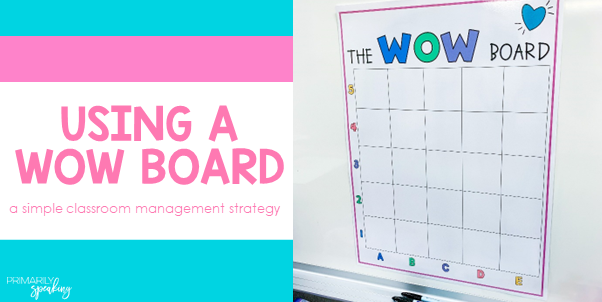
Classroom Management: Using a WOW Board

Have you heard of the WOW board? This tool is not a brand new idea, but I only started using it last year. And, I intend to keep using it!


Using a WOW board is a great (and super easy) way to recognize individual students and reward their choices, achievements, and efforts. It is also a great way to boost self-esteem too.

What is it?
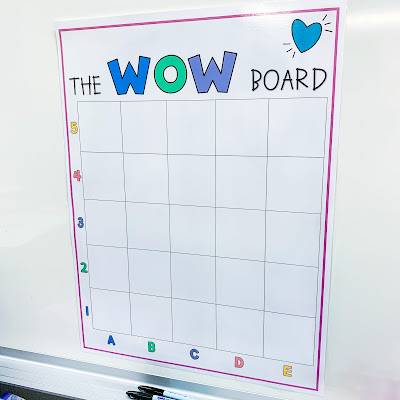
The board is simply a table that is printed onto poster sized paper. The table is labeled with letters along the bottom, and numbers along the side, creating cells. It is laminated so it can be used again and again.


I printed my board using the standard poster size setting on our poster maker. I know that some schools may not have a poster maker, but there is no rule that says your WOW board has to be poster sized!

How do you use it?
When you see a student making a smart choice, setting a good example, making gains, or whatever you feel should be recognized, they add their name to the board. They can choose any space they want and write their name in the selected space.

Many WOW boards have 100 spaces, but I like for it to fill up quickly, so my board has only 25 spaces. Since I use other means of recognizing students, like reward tags, I didn't want a board with 100 spaces. 

Since the board is laminated, students can use an Expo Vis-a-Vis marker to add their name. This makes it easy to erase and start over when we're ready to do so.

What do you do when the board is full?
When the board is full of students' names, I choose 5 students to receive a "prize." Really, they get to choose a classroom reward coupon. Prize buckets and I don't get along (#clutter). The classroom rewards cost me nothing and the kids love them. You can find all sorts of classroom reward options on TPT. Then, I erase the board and we start filling it up again and the cycle repeats.

How do you choose the winners? 
I usually just pick five random cells and write them on a sticky note, without looking to see whose names are in those cells. For example, I might write down A3, C4, B5, D2, E1. I call out the cell number and identify the name of the student written in that cell. They're a winner!

You could write all your cells (i.e. A1, A2, A3, etc.) on color tiles, small slips of paper, or anything else you can fit into a small bucket. Then, when it is time to choose your winners, you just pull a tile, slip of paper, etc. out of the bucket and match it to the name in that space on your board.

Using a Wow board is just another way to recognize your students and motivate them to do their best. If you'd like to give it a try, you can download my free template

If your school doesn't have a poster maker, don't dismiss the idea of using a WOW board. You could easily print this on regular paper and just use a smaller sized version. The kids will still love it!

DON'T FORGET IT, PIN IT!


Share It:

Classroom Management: Callbacks in the Classroom

Callbacks, also known as attention getters, are nothing new, but they are one of those classroom management strategies that just work. 


What makes callbacks successful is that they are fun. Students love responding to them and you rarely need to repeat yourself. Sometimes, when I call out "class" and wait for the "yes" response, I just get crickets. Truthfully, I think the students get tired of the same callback all the time. Callbacks add some novelty to the day and elicit an enthusiastic response.

How to Use
With callbacks, there is a teacher phrase and a student phrase. The teacher says their phrase (to get students' attention), then the students respond with their phrase to show that they recognize that it's time to pause and listen.

Introduce each callback to your students before using them. Practice it a few times with the students before actually using it to get their attention. 

Have students place their hands on their shoulders and put their eyes on you after they respond to the callback. Otherwise, they may very likely keep on doing what they were doing once you have initiated the callback. The idea is, you want their attention so you can share information or signal the next activity, so having them freeze in place with their hands away from objects and materials is a good way to do this.

Make sure you have everyone's attention before launching into your announcement or explanation. One simple way to do this is to just stand there and wait. Silently (a few seconds is all it takes). That silent teacher pause is pretty effective at getting students to realize that something is going on. Once you have everyone's attention, start talking.

Stick with callbacks that work for you and your students. Some may just flow better for you, stick with what makes you feel most comfortable. 

Switch up your callbacks. You can change them daily, weekly, or monthly. It's up to you! 

Post your current callback on your whiteboard. This way, students can see it, read it, and never forget it. 

Where can I find callbacks?
If you search callbacks on Google, you will find a ton of options! Here are a few:

T: Hocus pocus!
S: Everybody focus!

T: Peanut butter
S: Jelly time!

T: May the force...
S: Be with you!

T: To infinity...
S: and beyond!

If you liked that last one, then, you are in luck! I created a set of FREE callbacks that are all Disney movie themed. Simply, print, laminate, cut and use! You can post them on your board as you use them, or you can add them to a ring. It's up to you!


Click HERE for your freebie. I hope they make it fun and easy to get your students' attention!

Looking for more classroom management related posts?

DON'T FORGET IT, PIN IT


Share It:

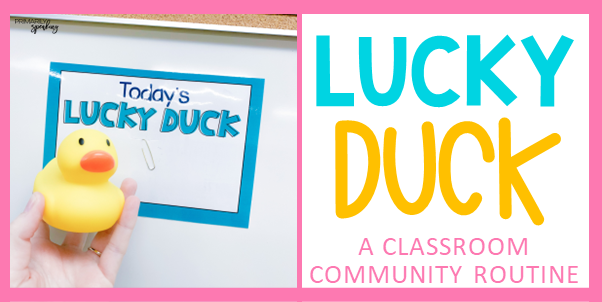
Lucky Duck {A Classroom Community Routine}

Teachers spend a great deal of time building classroom community at the beginning of the school year, but really, this is something that should go on throughout the year. I'm so excited to share with you a tried and true favorite community building activity of mine: Lucky Duck.


I have used this routine in my classroom for many, many years. It dates all the way back to my student teaching days (almost two decades ago).

I'm going to break down how "Lucky Duck" works in my room, but please know that it can be modified and used in a million different ways. So, feel free to tweak and customize these ideas to meet your needs and teaching style.

What is Lucky Duck?
Lucky Duck is basically the student of the day. Each day a new student gets to identify as the Lucky Duck. When you're 7, it's a pretty big deal.

How does it work?
Each day, after school, I select a new Lucky Duck. I have a small tray with my students' names printed on them. I rotate through the stack of names and place the daily name up on the board using the sign pictured below. Doing this right after school means that it's all set up for the morning (when there are always a million and one distractions).


These are the names in their little container. You can easily cut up index cards or cardstock to write students' names. You can grab my sign here for FREE (you'll need to handwrite your students' names). Rotating through the stack of names means that each student gets the chance to be Lucky Duck several times throughout the school year. 


Tip: Don't want to mess with a sign and name cards? Then, just write it all on your whiteboard. Same effect and the kids will still love it!

Once I identify the Lucky Duck, I place a rubber ducky on the student's desk. When the kids walk into the room in the morning, they can see who the Lucky Duck is by either reading the board or looking for the rubber duck.


What does the Lucky Duck get to do?
What I'm about to share is what makes this such a big deal to my students.

Daily News
First, they get to share some Daily News. Usually, I ask the students a question and they have to answer by restating the question. You can grab a similar set of questions here (freebie).


I write their statement on a piece of 12x18 construction paper using the this format: ______ said, "_________." I don't rely on the question cards 100% of the time. I often times invite the students share any random thought they'd like. This love this.


Daily News is so great for learning how to write the date (long and short) and how quotation marks work. It's also great for talking about parts of speech, capitalization, phonics, or whatever your teacher heart is drawn to in the moment. I frequently ask students to identify compound words, words with a specific number of syllables, words that rhyme with ___, to identify nouns or verbs or adjectives, we discuss capitalization and commas in a series, and so on.

Daily Cheer
Second, the Lucky Duck gets to pick the cheer of the day. I have a collection of Dr. Jean chant/cheer cards. They choose one from the designated box and we use it throughout the day. Sorry, no pic but if you search Dr. Jean chants on TPT you can find some great freebies!

Calendar
Third, they help lead calendar. Again, no pic. I really have got to get better about snapping pics in my room! Anyhoo, we use a digital calendar which can be manipulated using a special pen for the whiteboard (I do not have a smartboard, it's just some pen that connects to my projector/computer and has some sort of magical powers I do not fully understand). 

The Lucky Duck leads us through the calendar slides and calls on people to share answers. They also get to prompt them to show their whiteboards. In my classroom, we use the signal, "3-2-1 show!" when using whiteboards. I never thought that being able to say those words would be such a hit, but they are. Haha!

Daily News Part 2
Fourth, the Lucky Duck gets to decorate/illustrate their Daily News. They can do so in their free time, or during reading group time that day (if their group isn't meeting with me).


At the end of the month, I put all the Daily News pages together into a special book and add the books to our classroom library. They absolutely love reading the Daily News books over and over again. They enjoy seeing their own pages, and delight in reading about their classmates. This allows them to learn more about each other and find commonalities.

As you can see, the book doesn't look special, but I'm telling you, they are always the most popular books in the classroom library. The cover is simply two pieces of colored 12x18 construction paper with the simple title written in Sharpie. I have started laminating the covers due to the popularity of the books.


Line Leader
Finally, the Lucky Duck gets to be the line leader for the day. Enough said, we all know that's like the BEST classroom job/privilege in the whole wide world.

This routine is a beloved one. The students absolutely love being Lucky Duck. They all get their moment to shine (several times throughout the year), and they get to know more about one another through Daily News. When we sit on the carpet to hear what the Lucky Duck has to report, the students are at full attention. It's an easy way to help students feel special while fostering community in the classroom.

The only cost involved with this routine is the one time cost of a rubber duck. Mine cost like $3 on Amazon. Can't beat that!

I hope you enjoyed reading about this special routine. Please share your favorite ways to build community throughout the school year in the comments below.

DON'T FORGET IT, PIN IT!


Share It:

Easy & Effective Classroom Management Ideas

One of my favorite things to do is see what other teachers are up to in their classrooms. When teacher's share their ideas, I eat it up! I'm always on the lookout for new ideas, new tricks, and new tips.


If this sounds like you, then keep reading. This post will peek inside my classroom as I share more of my favorite classroom management tips and ideas. Click here for my other classroom management ideas post.

This post contains affiliate links for your shopping convenience. I earn a small commission each time someone makes a purchase through one of my links. For more information about my Disclosure Policy, please visit this link.

TIME KEEPER
Like I mentioned, I love learning new things from other teachers. Welp, guess how I learned about this handy classroom management tip? Another teacher! My teammate shared this genius idea with me.

Basically, the time keeper holds this oil timer and watches the rest of the class during independent work time to make sure they are doing what they are supposed to. It is a way to encourage kids to stay focused (and quiet) during their independent work time. It works because everyone wants to be the time keeper!

Once the kids have started working, I choose a student to come to the front of the room. I do this by casually placing the timer on their desk. That's their signal that they have been chosen as the first time keeper. This student gets to hold the oil timer at the front of the room (where they can see the whole class). As the timer runs its course, the time keeper is looking for their replacement (someone who is working, not talking, not messing around, etc). When the oil timer runs out, the time keeper simply places the timer on the next student's desk. This continues until your independent work time is over. You can find these oil timers on Amazon. 

FLASHY DESK CHECKS
I know checking the cleanliness of student desks is nothing new, but one day I found a fun and exciting way to do this. The kids loved it so much, that I do use this method of checking desks often.


I took this flashy wand (as I call it) and went desk to desk. If the inside of their desk was meeting the expectations I made perfectly clear to them the first week of school (and all the days after that), I tapped the wand on their desk and they got a reward tag. They take great thrill in seeing the wand light up. It's the little things, friends. Since it was such a hit, I've continued to use this method.

Note: Sometimes I give a reward tag that is specifically for having a clean desk, but other times, it's just a reward tag reminding them that they are awesome (see above).

This is something I'll often do if we have an extra 5-7 minutes because it doesn't take long to peek inside a desk and see who knows how to keep their materials organized and who doesn't. You can find these flashy wands in the Target Dollar Spot (or whatever it's called these days).

REWARD TAGS
Oh goodness, there is sooo much I could say about reward tags. They are such an effective tool to use in your classroom. So effective, that I've written several posts about them. Click here for allllll the details.

Basically, reward tags are little tags that students earn for making good choices, working hard, meeting goals, working toward goals, accomplishments, and whatever else you want to recognize a student for. Over the course of the year, they collect tags and place them on a ball chain necklace (a ring clip works too!). In my classroom, students wear their necklace any time they earn a new tag, and everyone wears their necklace on Fridays. Again, click here to read the many blog posts I have detailing all things reward tags, including useful tips and tricks and the ins and outs of using them. 

MOVEMENT CODE WORD
This trick may just make an appearance in any classroom management blog post I write. That's how much I love it!


A movement code word is exactly what it implies. You move when you hear the word. I started using this several years ago when my class thought they should follow the directions as I was giving them. Sigh. It was driving me bonkers. I started using the code word and told them they could not move until I was done talking and I said the code word. It turned things into a game of sorts (and no, no one loses and you don't get in trouble for forgetting).

I change my word weekly because changing it daily would never work for me. Like never. I like to use silly words. Some people like using academic words. Our day is so regimented that I prefer using a fun, silly word. It's a simple way to add more fun to the day.

I have an entire blog post about using a movement code word. Click here for all the specifics.

NAME STICKS
Sticks with students names. I don't know what genius came up with this idea years and years ago, but it's a management trick that's still going strong.


You can use name sticks for so many things: calling on students, pairing students, choosing a mystery walker, attendance, and MORE! Click here to read (in detail) the many ways that name sticks can be used in the classroom.


FAST FINISHERS
You need to have a plan for students who finish their work early. Otherwise, chaos will ensue. Okay, maybe not chaos, but you'll have a handful of kids just doing what they want and most likely distracting their classmates.

In my classroom, if you finish an assignment early, you can either:

  • Work on unfinished work (must do, if you have any)
  • Read silently
  • Choose a fast finisher activity

Giving students a choice is important, and this is one way I can do so when there are so many restrictions in place that dictate how our day looks.

My fast finisher activities are kept in drawers. The students can choose any activity from any drawer. I have 9 drawers total so I don't have to swap out the content very often. I typically stock the drawers with various sight word activities, grammar puzzles, and/or math puzzles. Here are a few examples of what I have put out in the past.

Sight word drills:

Sight word flash cards:


Miscellaneous puzzles and activities from Oriental Trading:


BUBBLE WAND
I'll admit, this little trick is definitely fluff. But, I won't apologize for it because the kids love it. I found this light up bubble wand when we went to Disneyland last year. I had to have it. I


I use the wand to shower partners/small groups of students with bubbles when they are working with an appropriate voice level. When kids work together they have a harder time with voice levels. When one group sees another being showered with mini bubbles, they work harder to control their voice levels because, I mean, who doesn't want a 15 second bubble party?

You can find light up bubble wands on Amazon. I haven't used them, but if you like this idea, and don't plan on visiting Disneyland any time soon, maybe there is one here that would work for you. :)

TEAM CAPTAIN
I have five table groups in my classroom. Sometimes, I need one person at that group to get materials for the table, or get privacy offices for the group, collect papers from the group, etc. I've found that designating one student as the team captain is the easiest way to do this. I don't have to spend time picking a student. The captain just does it.


Every Monday, I choose a new team captain. When the students see a little dino like this one on their desk, they know it's their turn to be team captain. I only have one rule...do NOT touch the dino. If they do, they lose it. They don't lose their position as team captain, they just don't get to sit with their dino pal for the week. Basically, they get to practice some self-control with this position. ;)

The dino is a bath toy. I got this set on Amazon.

That's it, friends! I hope you found an idea or two to try in your classroom. Don't forget to click here for more classroom management ideas like picking a mystery walker, using sticker books, and more. 

DON'T FORGET IT, PIN IT!


Share It:

Classroom Management: Name Sticks

Name sticks are a useful, yet effective, classroom management tool. They're also extremely versatile.


Before I really get started here, I want to point out that name sticks are nothing new. Teachers have used them for years. I think that's a testament to how useful they can be.

I recently shared my name sticks on Instagram where I also shared how I use them, and a few friends over there shared how they use them. That's what this post is all about, all the ways you can use name sticks in your classroom.

What is a name stick?
Name sticks are exactly what the name implies, sticks with (student) names written on them. Most often, you'll see teachers using craft sticks like the ones shown below. In my opinion, "jumbo" size is the way to go. That size is just easier when you're trying to write names.


You can use them straight out the package. Grab a stick, write a name (I like to use Sharpie), repeat. Put all of your sticks into a little pail/can.


Sometimes, you might see teachers get kind of crafty with their sticks. I tend to get crafty. This is not necessary. Some teachers like to craft and enjoy making things for their classroom.

Some years, I paint my sticks. And, every year, I glue a bow on them. I like bows. Not sorry.


I'm often asked where I get my bows. I make them! I use 3/8" wide ribbon, tie a bunch of mini bows, and then hot glue them to the top of the sticks.

When I don't feel like painting the sticks, I just add the bow.


The stick shown above has a unique shape. They look like mini paint stirrers. I found this particular stick style at Hobby Lobby, alongside the "regular" shaped craft stick.

The colors of the bows (or sticks, when I paint them) bears no meaning to me. I simply choose colors that match my classroom because that makes me happy. I grab and label the sticks at random. But, if you choose to decorate your sticks, the colors could mean something if you wanted them to.


How can I use them?
There are so many ways you can use name sticks. Let's take a look at all the ways you can use name sticks in the classroom.

Calling on Students
This is probably the most common way teachers use name sticks: calling on students at random. When you notice that the same 3-4 kids are raising their hands for every single question, pull a name stick. This reminds students to really pay attention.

You can even rely on the name sticks. That is, instead of asking for volunteers to answer questions, share ideas, etc, you simply pull name sticks one a time. Again, this will remind students to stay focused, and you can be sure not to call on the same student more than once.

Note: Some people prefer to write numbers on their sticks so they can reuse the same set of sticks every year. If this idea works for you, that's awesome! I personally prefer writing student names because I don't want I call out numbers (too impersonal). Also, I like to know whose stick I'm pulling because my brain can't match names to numbers that quickly on the spot. So, writing names is probably a time saver for me. Hehe.

Grouping Students
Need to make groups quickly? Then, get that little pail of name sticks because you'll be able to group your 27 students in no time at all.  Decide the size of each group. Grab that many sticks and BOOM, you have a group. Repeat until all of your students are grouped.

Pairing Students
I know, I know, pairing up students isn't all that different than grouping students. But, the sticks will still be a super quick way to quickly pair up students.

Tip: A sweet friend on Instagram, Marna, shared a great tip for what to do when you have an odd number of students. She lets that person choose which group they join, I absolutely love this idea.

Mystery Walker
When my kids start getting a little too comfortable in the hallways, I choose one or two mystery walkers. I simply pull a stick, or two, before we leave the room. I do not announce whose names were pulled. I keep an eye on those students and if they do a stellar job in the hallway, I let them know when we get to wherever it is we are going and I give them a Mystery Walker reward tag. Learn more about reward tags here.


On the Spot Helper
If you have a quick task that you'd like a student to do, pull a stick! You could have that student help you with a specific task like passing out papers or materials, erasing the board, helping you with part of a lesson, and so on. You could also have them deliver things like notes to other teachers/office, retrieve a book from the library for you, or take the lunch cards to the lunchroom.

Seating Arrangements
Another sweet Instagram friend, Candace, shared that she uses her name sticks for seating arrangements. The students draw a stick (which she numbers) and then they sit at the desk with that number. Of course she reserves the right to move kids as needed once they choose their seats, but she tries to give them the benefit of the doubt. Love that!

Sub Helper
Substitutes are often overwhelmed when they guest teach in your classroom. They usually have the goal of following your plans, adhering to schedules, and figuring out procedures which can make learning names quickly more challenging. Sharing the name sticks with your sub means they can use them to call on students, choose helpers, and so on without saying, "Yes, you, with the red shirt."

As a Library Marker
Another fellow teacher on Instagram explained that she's used name sticks as library markers. When students remove a book from the shelf, they place their name stick in that space so they remember where their book goes when it's time to put it away. I've seen this done with paint sticks as well. It's a great way to teach kids to be responsible with shared classroom materials.

Taking Attendance
Once upon a time, my students would walk through the door, take their stick and place it in on one side of a pocket chart to indicate whether they brought their lunch from home, or if they were getting school lunch that day.  I placed the pocket chart and stick at the doorway so students remembered to do this as they walked in each morning. I loved this system. I could quickly see who was absent and who needed their lunch card that day. Sadly, this set up just didn't work with our pod situation at school. Since we entered the school all at once from the playground, my class was always backing things up out into the hallway and I didn't have any other place to put this chart. So, I stopped using the sticks in this manner. However, many people on Instagram reported that one of the things they use the sticks for is taking attendance and I still think it's a fabulous use of name sticks.

I'm sure there are other useful ways to use name sticks. If you have one that wasn't mentioned here, please share it in the comments below. :)

DON'T FORGET IT, PIN IT!



Share It:

Classroom Management: Movement Code Word

Hey everyone! Do you wish there was a way to get your students to stop and listen before they start moving around? Well, I'm about to blow your mind, there is!


I've been using a movement code word for several years now, and while I've shared this trick before, I thought I would dedicate a whole post to it because whenever I share this on Instagram, I get lots of questions.

What is a movement code word?
In short, a movement code word is a word that you say when you are ready for kids to start moving.

classroom management transitions

It's a way to ensure that students sit still and listen to your directions before they are allowed to follow them. It helps make sure they don't begin transitioning until it is time to.

Picture this, you're trying to give directions, but as you give them, the kids are busy moving around trying to follow them, as you're giving them. We all know that never works and it's very distracting. By using a movement code word, you give your directions, but the students are not allowed to move until you say the word.

It turns the act of listening and getting ready to transition into a game of sorts. Something that resonates with most kids.

So, how does this look in the classroom?
Here's a sample of how I use the movement code word with my students. In this scenario, the movement code word is "taco." I might say something like this:

"When you hear the code word, you need to take out your whiteboard, marker, and eraser. Then, sit with 'hands and eyes.' Remember, we transition at a level zero. Ready, set, TACO!"

At this point, the students take out their materials and then sit with "hands and eyes" (our way of showing that we are ready to get started).

Why does it work?
It works because it turns transitioning into a game. Students are listening for that one word and once they hear it, they know they get to move.  Once they do hear it, they are excited to move. Excited to get started.

What kind of word do I use?
When using a movement code word, use any word you want. I tend to choose silly, random words. I do prefer 2-3 syllable words. Sometimes, I choose two words. Couldn't tell you why, I just do.

classroom management transitions

I like to have fun with my code words so I tend to choose words like:
-taco
-lollipop
-jellyfish
-nectarine
-applesauce
-Hello Kitty
-cactus pants
-pumpkin guts
-candy cane

Some teachers may prefer to use sight words or vocabulary words. That's just not my thing.

Using silly words is one way that I can mix in a bit of fun to our day. The kids love the words and I like to think that these kinds of words help create more student buy in.

Who chooses the words?
I do. But, that's not to say that you couldn't involve your students. Do what works for you. :)

Where do I display the word?
I keep it simple (my life's mantra). No fancy signs, no magnetic cards with words typed in designer fonts. I take an Expo marker and write the word in the corner of my whiteboard as shown below. That's it.

transitions classroom management tip

How often should I change my word?
I change my word once a week. I know myself too well and trying to change the word daily would never, ever work for me. After school on Friday, I change the word so it's ready to go on Monday morning.

How long does it take for kids to learn this procedure?
Like any procedure you teach, there might be some trial and error at first. I say might because each year is different. This was the first year where my students needed a bit more time to get used to a movement code word.

As with any procedure, you need to practice it. More than once. Don't expect to introduce it and have your students follow it without fail from that point forward. Be patient, review the procedure, practice the procedure.

Do the kids get in trouble if they don't wait for the code word?
No. That would be a silly thing to discipline a student over.

If a student (or a few students) forget to wait for the code word (which can be normal when you first introduce this strategy), I simply point out that they are trying to get started without waiting and then initiate a "do over." I stop the students and have them sit with "hands and eyes" (whole brain teaching), repeat the directions, restate the code word, and then we move on from there. Like any procedure, you might need to repeat it several times before kids are able to do it correctly.

Is it too late to start using a code word?
Nope. When it comes to classroom management, you implement strategies as needed.

It may be the middle of the school year, but if your students are still struggling to wait for you to finish talking before they start moving, try this strategy.

Whenever I bring in a new strategy mid year, I just tell my students that it's something I tend to start doing "this time of year." You don't have to tell them that it's a new strategy and that you're curious to see how it goes. Act as if you've always used it and it's now that time of year to get it going in your classroom.

Add a bit of fun.
Once you've established your movement code word routine and the kids have really got it down, have a little fun with it. I like to psych my kids out by calling out fake code words. This keeps the kids on their toes and adds a bit of fun to the procedure.


The fake code words that I call out always sound like the code word of the week. For example. I recently used the code word "stinky socks." I called out "stinky Socrates" and "stinky salami." Doing this makes the kids laugh, and of course they know that I'm trying to "trick" them but it gets them focused on waiting to hear the actual code word.

I don't do this daily, nor do I do it all day long. Most days, I stick with the code word itself. But 1-2 times a week, at one point in the day, I might call out fake words. I'm never opposed to adding some fun and humor to our procedures when I know the kids can handle it.

Final Thoughts
I hope this post has answered any questions you had about using a movement code word. I have found that this strategy has been effective in my classroom over the years. But remember, we all have different teaching styles. This idea may not appeal to you in the least, and that's OK. You may like the idea but see some aspects you'd like to modify to better match your teaching style. Go for it!

If you have any fun code words to share, we'd love to hear them. Be sure to comment below with your ideas.

DON'T FORGET IT, PIN IT!


Share It:

Tips for Prepping Reward Tags

I've written several posts about reward tags, but I've never focused solely on tips for prepping reward tags. After replenishing my own reward tag supply the other day, I decided a post dedicated to prepping reward tags was long overdue.


This post contains affiliate links for your shopping convenience. I earn a small commission each time someone makes a purchase through one of my links. For more information about my Disclosure Policy, please visit this link.

If you are looking for posts on what reward tags are, how to use them, how to store them, and so forth, click here because this post will focus strictly on prepping your tags.

Reward tag prep can be broken down into four easy steps: print, laminate, cut, and hole punch. But first....

The Most Important Tip for Prepping Reward Tags
The most important tip is to prep all of your tags during the summer. This way, the tags are ready to go on day one and you don't have to think about it during the school year. Prepping your tags can easily be done while you're binge watching Netflix. It's the perfect "TV task" as I like to call it.

Step 1: Printing Your Reward Tags
The first step is to print your tags.

Tip #1: Choose your paper. Card stock is a great option. So is this 28 lb. paper. It's thicker than regular printer paper, and smoother, and when printing in color, the designs look really vibrant. There is also a 32 lb. option, but I haven't tried it yet.


Tip #2: Decide which tags to print. You don't want to print ALL the tags. If you just print any and every tag, you'll end up with a collection that overwhelms you and you'll likely have a hard time using them. Instead, decide which tags you want/need to print.

If you're new to reward tags, decide how you will use them (to recognize effort, behavior, academic achievement, and/or a combination of all three) and print a manageable collection of tags that meets your needs.

If you're a reward tag veteran, make note of what you need before school gets out and print what you need over the summer.


Tip #3: Enroll in HP Instant Ink so you can print all your tags in color without breaking the bank! You do need an eligible printer (using the link click on FAQs for a list of eligible printers), but enrolling in the HP monthly ink program is so worthwhile, especially if you don't have the ability to print in color at school. I do not have access to a color printer at school, so if I want to print in color (and I do), I must do so on my own dime.

The HP program is one of those things that seems too good to be true, but it's for real and it's awesome. Basically, you sign up for a plan based on the number of pages you'd like to be able to print each month (ranging from just a few dollars a month to $20 or so a month). If you don't use all your pages, they do roll over. And, as you print, HP gauges your ink levels. When you get low, they send you more ink. Best part, you can change your plan whenever you want! In the summer I use the Frequent Printing ($10 a month) plan that allows me to print more pages, but during the school year I adjust to a plan with fewer pages and costs less ($5 a month). Click HERE for more info and to enroll.

Tip #4: If you don't like the idea of printing in color use black and white reward tags. All you need is some colored paper (card stock or Astrobright). I offer a full collection of black and white reward tags in my store.


Step 2: Laminate
The next step is to laminate your tags for durability. To laminate your reward tags, you'll need a laminator and some laminating pouches.

Tip #1: Use a personal laminator. This allows you to seal the tags in a much thicker layer of lamination (compared to school lamination) making them more durable in the long run. Many teachers already own a personal laminator, but if you don't, it's a great investment. They can typically be purchased at Target or Walmart for around $20. You can also find them on Amazon (but usually at a higher price).


Tip #2: Don't be afraid to use the "generic" laminating pouches. I use these pouches from Nuova. They are great. They are nice and thick and they seal up really well. And, best of all, they aren't pricey.

Tip #3: Set your laminator to the 5 mil setting. This makes the machine a bit hotter and will ensure that the lamination sets as it should.


Tip #4: Laminate the entire sheet of tags before you cut. It's counterproductive to cut your tags, laminate them, and then cut them again. Trust me, I've laminated the full sheet of tags for years and it works like a charm.


Step 3: Cut
Now, you're ready to cut out your tags. You can do this with scissors, of course, but if you're looking to maximize efficiency, keep reading.

Tip #1: Use a paper trimmer to cut apart your tags. This little tool makes it really easy to prep several sets of reward tags at once, and your hands don't cramp up in the process.


Tip #2: Use a paper trimmer with a guide wire. This speeds up the cutting process. Line the guide wire up with the lines on the sheet of tags and slice away.


Tip #3: Use the paper trimmer to trim the edges off each set of tags. This goes super fast when using a paper trimmer vs. scissors.

Tip #4: Cut the tags into rows (3 rows per page).  


Tip #5: From there, cut the rows apart into individual tags. You can use the paper trimmer to do this, or you can use scissors because at this point, you're just snipping them so they become individual tags.


Step 4: Hole Punch
To hole punch your tags, I have a few tips.

Tip #1: Use a regular hole punch. If you go this route, use a padded one. This pair from Fiskars is great. I own it in two different sizes, but the standard 1/4 in. size works great for reward tags and it's the one I use most often.


Tip #2: Use a three hole punch. This is my new go to when my hands are inflamed and my grip is weak (which is often these days). To use the three hole punch:
  • Place two tags beneath each of the three punches. 
  • Eyeball it the best you can. Being perfect isn't necessary, but aim for the middle the best you can.
  • Make note of the marks on the built in ruler where you lined up the tags so you can quickly align the rest of them. 
This technique lets you to punch 6 tags at a time. It gets the job done quickly and you'll really save your hands while you're at it.


A Few More Tips for Prepping Reward Tags

  • Use the summer months to prep your reward tags for the whole year so you don't have to think about it during the school year. Ok, so that tip was already shared, but it's that important. ;)
  • Ask your family to help with laminating, cutting, and/or punching the tags.
  • Let parent volunteers help with the laminating, cutting, and/or punching if that works better for you.

Ready to Prep Some Tags?
I hope you're ready to give a few of these tips a try! Grab this FREE set of tags and start prepping them for your classroom today! Click HERE to grab your freebie. The download includes a black and white version. :)


More Reward Tag Related Posts
I have a few other reward tag posts that you might find helpful. Check them out here:
Raving About Reward Tags 
Reward Tags {All Your Questions Answered}

Reward Tag Resources
Looking for a more complete reward tag collection?  Be sure to check out my resources on TPT.  I have lots of options available.  Click on an image to learn more. :)


DON'T FORGET IT, PINT IT!


Share It: